
A dental CAD built native, from the ground up.
DentalCraft is a desktop application for digital dentistry, written in Rust with a GPU 3D viewport. It starts with clear aligner planning and is designed to grow module by module.
In development. Not a medical device. Not for clinical use.
Early stage. Linux and Windows first. Made in Italy.
Presentation
What exists today
What DentalCraft is, and where it stands
DentalCraft is a native dental CAD. It grows out of an orthodontic aligner planning tool that its author first built as a Blender add-on. DentalCraft rebuilds that work as a dedicated, faster, standalone application, with a structure inspired by professional dental CAD suites: a common core plus modules.
The project is at an early stage. Today the application shell, the project format and the 3D viewport exist. Scan import and the clinical algorithms are being ported and validated.
Status, today
- Application shellExists today
- Project format (.dcprj)Exists today
- GPU 3D viewportExists today
- Scan importIn progress
- Clinical algorithmsIn progress
The 75-second presentation
A short overview of the project and its direction. Animations in the video are concept illustrations of the intended workflow. About 75 seconds. English text, Italian subtitles.
Read the transcript
Transcript of the on-screen text. Scenes 3 to 6 are concept illustrations of the intended workflow.
- 0:00DentalCraft
- 0:06A dental CAD, built native. From a Blender add-on to a standalone app.
- 0:14Start from the scan. STL, OBJ, PLY. Arch. FDI numbering.
- 0:24Segment. Reconstruct. Diagnose. Space analysis, Little index, Bolton.
- 0:34Plan the final position. Stage by stage, within per-tooth limits.
- 0:47Shell, trim line, stamp. Export STL per stage.
- 0:55The application today: shell, project format, 3D viewport, scan import. Clinical algorithms: being ported and validated.
- 1:03Aligners first. More modules planned.
- 1:10In development. dentalcraft.app. In development. Not a medical device. Not for clinical use.
The application today
Screenshots show work in progress and will change.
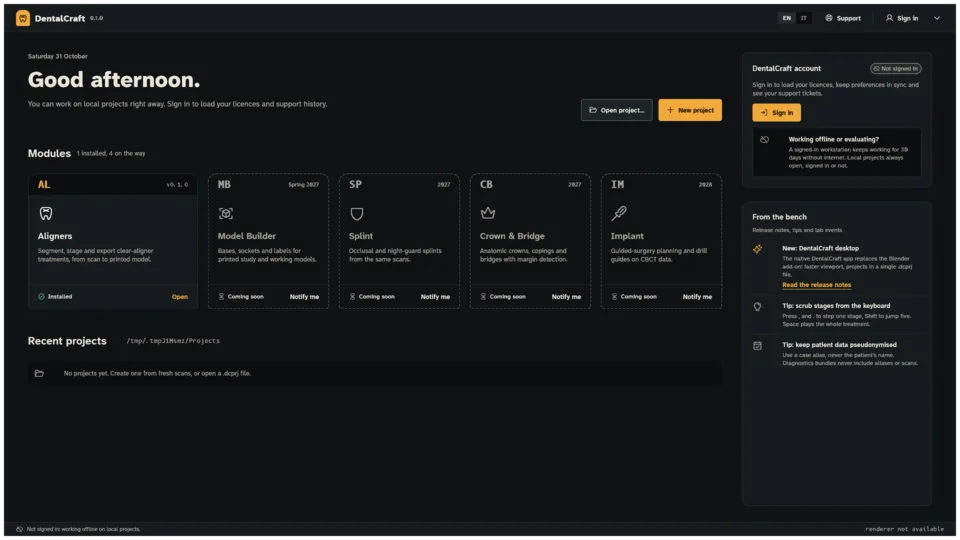 Work in progress
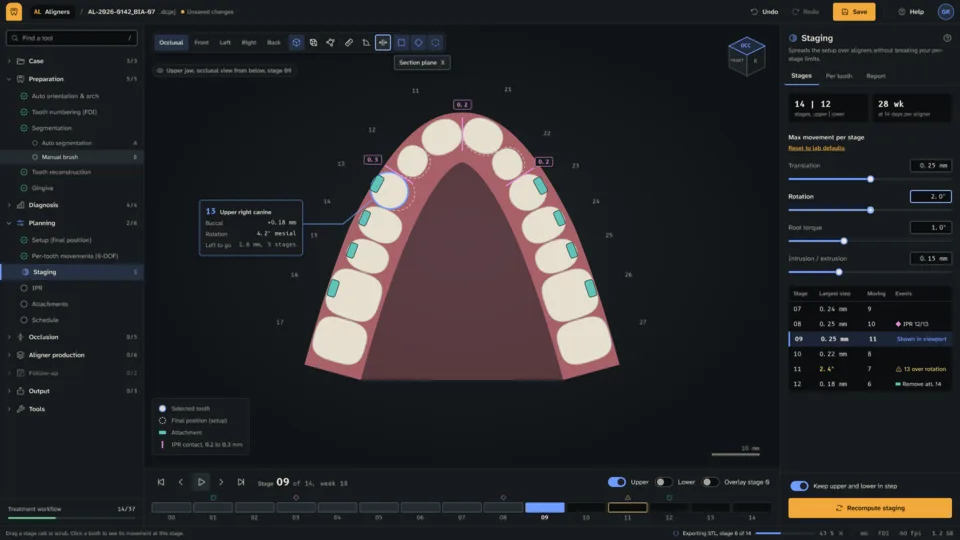 Work in progress
Vision
Intent, not features
Why a native dental CAD
Dental planning means heavy 3D data and long sessions. We think the software should stay fast, stay local and stay under the clinician's control. DentalCraft is being built around those ideas.
What follows is intent, not a description of finished features.
Native performance.
A Rust application with a GPU (wgpu / Vulkan) viewport. The aim: no UI freezes, even with large scans.
Offline-first.
Projects live on your machine. The software should not need a connection to do its work.
One open project file.
A single documented .dcprj file: a versioned ZIP container with checksums.
Pseudonymised patient data.
Project files are designed to carry no patient names.
English and Italian interface.
Both languages from the start.
Linux and Windows first.
macOS later.
Built with a regulatory mindset.
Requirements, risk management and traceability are carried over from day one.
Independent and made in Italy.
One developer, a long-term view.
These are design intentions. They describe where we are heading.
Roadmap
No dates announced
One core, several modules
DentalCraft is structured as a common core with modules on top. Aligners comes first. The others are planned, with no dates.



Aligners
In progressFirst module. In active development.
Model Builder
PlannedSplint
PlannedCrown & Bridge
PlannedImplant
Planned
No release dates are announced. Order and scope may change.
Aligners
First module
From scan to aligner, in one workspace
The Aligners module is designed to follow the clinical path from intraoral scan to printable output. The stages below are grouped like the application menu.
Intended workflow. Each stage is tagged Planned or In progress. Nothing here is available yet.
In progressBeing ported or validated.
PlannedNot started.
Case
In progressStart from the scan.
Import intraoral scans (STL, OBJ, PLY)
Preparation
PlannedMake the data ready to plan.
Orientation and arch; FDI tooth numbering; segmentation; tooth reconstruction and gingiva
Diagnosis
PlannedMeasure before moving.
Space analysis; Little irregularity index; Bolton analysis
Planning
PlannedDefine the target and the steps.
Setup of the final position; staging per aligner with per-tooth movement limits; IPR; attachments
Occlusion
PlannedCheck how the arches meet.
Occlusion and bite, including bite with aligners
Aligner production
PlannedPrepare the shell for printing.
Aligner shell with thickness and clearance; trim line; identification stamp; print check
Follow-up
PlannedCompare plan and progress.
Follow-up visits
Output
PlannedFiles and reports.
STL export per stage; reports
Downloads
Nothing to download yet
Coming soon
There is nothing to download yet. Come back to this page for news, or write to us.
- Coming soon
Linux
- Coming soon
Windows
- Later
macOS
This site has no forms and collects no data. See the privacy note.
Or contact: hello@dentalcraft.app
In development. Not a medical device. Not for clinical use.